Some episodes appear out of order. How can I fix this?
The list of episodes is coming from a playlist hosted on the Internet Archive. The playlist was created by the original uploader and only they can modify the list. We can't fix it on our end or rearrange the items in the Archive.org playlist.
However, you can look at the list of episodes and click the ones you want to watch in any order. The trick is to learn how to read the names of the items in the playlist. For example, you might see a video track listed like this:
S01E26 - Dash to Delaware
This stands for: Season 1 (S01), Episode 26 (E26)
It might also be written like this:
01x03– Season 1, Episode 031x10– Season 1, Episode 10101– No Season, Episode 10107.– No Season, Episode 07EP01– No Season, Episode 01
Each uploader to the Internet Archive names their own files in whatever method they want. There is no "standard format". But, you can see the basic pattern of how Seasons and Episodes work in the video file names?
The most common issue that people encounter is that Season 2 or Season 3 episodes might appear in the playlist before Season 1 episodes. So, if you encounter this problem, scroll down and find the Season 1 episode you want to watch and click to play. Take a look at this sample video playlist below:
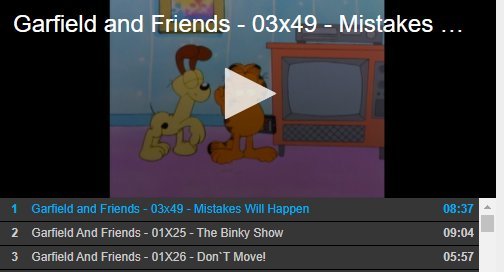
As you can see, Season 03, Episode 49 is listed first in the playlist, followed by Season 01, Episode 25 and Season 01, Episode 26.
But, if you scroll down in the same playlist, you will see the first episode: Season 1, Episode 1 – Peace and Quiet:
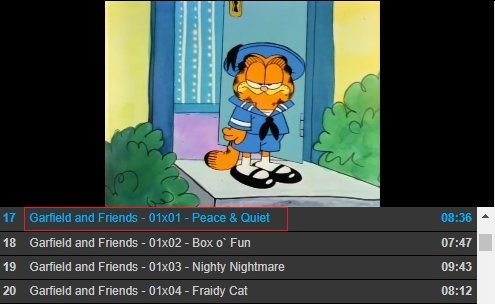
You can click on this file in the playlist to watch the first episode. Using this method, you can jump around to different tracks in the playlist and watch the show episodes in the correct order. Some of the shows on the Internet Archive are DVD rips which contain extras. Often times, these extras appear in the playlist above the episode tracks. Try scrolling down, finding the season and episode you want, and clicking to play in the order you want.